What is Carthage?
Carthage is a hybrid Rust + C++ application framework designed for building high-performance, GPU-accelerated applications across desktop and mobile platforms.
Unlike traditional frameworks, Carthage prioritizes zero-overhead abstractions, native performance, and cross-platform compatibility without sacrificing developer ergonomics.
Rust + C++
UI logic in Rust. Audio DSP in C++. Connected via zero-overhead CXX bridge.
Vello + WGPU
GPU-accelerated 2D vector graphics. Metal, Vulkan, DX12 backends.
Universal
macOS, Windows, Linux, Android, iOS. Single codebase.
Core Features
Material 3 Widgets
8 production-ready UI components with consistent theming and interaction states.
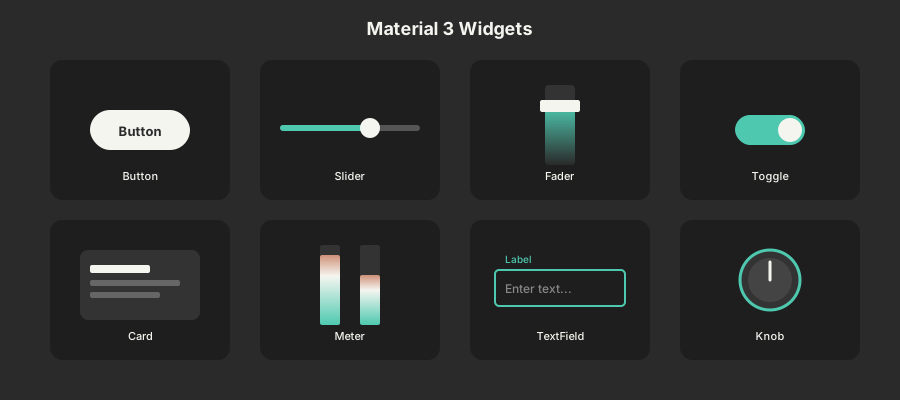
Button
Elevated, filled, and outlined variants with hover/press states
Slider
Horizontal parameter control with smooth drag interaction
Fader
Vertical volume control with gradient fill indicator
Toggle
Animated switch for binary on/off states
Card
Elevated surface container for grouping related content
Meter
Level visualization for audio feedback and monitoring
TextField
Text input with label, focus states, and validation
Knob
Rotary control for precise parameter adjustments
use carthage_ui::widgets::*;

fn view(&self, ctx: &mut ViewContext) {
    // Draw a themed button
    Button::new("Play")
        .position(100.0, 100.0)
        .draw(&mut ctx.scene, &ctx.theme);

    // Draw a vertical fader
    Fader::new(0.8)
        .position(200.0, 100.0)
        .height(200.0)
        .draw(&mut ctx.scene, &ctx.theme);

    // Draw a meter for audio feedback
    if let Some(feedback) = &ctx.audio_feedback {
        Meter::new(feedback.peak_left)
            .position(300.0, 100.0)
            .draw(&mut ctx.scene, &ctx.theme);
    }
}